
Shopping for smart home dorm room gadgets means balancing three things that rarely coexist: limited desk space, strict budgets, and dorm rules about wiring and wall modifications. The LED Desk Lamp with Power Strip takes my best overall spot because it solves the dorm room’s oldest problem — never enough outlets — while adding stepless dimming and four USB ports in a single footprint. If sleep quality is your priority, the Hatch Restore 3 justifies its premium price with sunrise alarms and white noise, while the budget-friendly GHome WiFi Smart Plug makes any dumb appliance voice-controllable for under $15. The main tradeoff you’ll face is between multipurpose devices that cut clutter and single-purpose devices that do one job exceptionally well. Keep reading for the full breakdown of all nine picks.

Get home appliances delivered free with Prime
- Fast, free delivery on millions of items
- Prime Video, Amazon Music and more included
- Member-only deals all year
Complete the kit


Key Takeaways
- Multipurpose desk lamps dominated the value rankings — the top pick combines a lamp, 3 AC outlets, and 4 USB ports, effectively replacing three separate dorm purchases with one.
- The smart plugs are the cheapest entry point into dorm automation, but the power strip version with energy monitoring costs only slightly more and handles far more devices.
- The Hatch Restore 3 and Echo Spot overlap on wake-up functionality, but they serve opposite users: the Hatch is a screen-free sleep ritual device, while the Echo Spot is a full Alexa hub with a display.
- The Govee RGBIC lamp is the only pick focused purely on ambiance rather than utility, making it a want rather than a need unless room aesthetics matter to you.
- The Levoit air purifier is the sole non-connected pick — it earns its place through dorm-specific value (pet dander, dust, shared air) rather than smart features.
| LED Desk Lamp with Power Strip, 3 AC Outlets, 4 USB Ports | 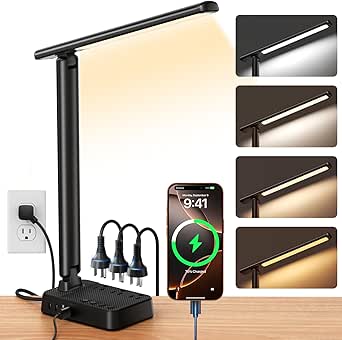 | Best Overall | Light Source: LED (64 sources) | Charging: 3 AC outlets, 4 USB ports (2 USB-C) | Controls: Push button, stepless dimming | VIEW LATEST PRICE | See Our Full Breakdown |
| LED Desk Lamp with 10W Wireless Charging & Pen Holder |  | Best for Cable-Haters | Light Source: LED | Charging: 10W wireless charging pad | Controls: Touch | VIEW LATEST PRICE | See Our Full Breakdown |
| GHome WiFi Smart Plug with Alexa and Google Assistant | 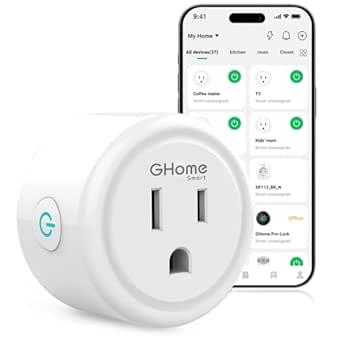 | Best Budget Smart Home Starter | Current Rating: 10A | Voltage: 120V | Wattage: 1200W | VIEW LATEST PRICE | See Our Full Breakdown |
| LiFMIRA Desk Lamp with 2 USB Charging Ports, Touch Control |  | Best Value Lighting | Power: 12W LED | Controls: Touch | Lighting Modes: 5 color modes, 10 brightness levels | VIEW LATEST PRICE | See Our Full Breakdown |
| Govee RGBIC Smart Table Lamp 2 |  | Best for Ambiance and Smart Control | Brightness: 500 lumens | Color Temperature: 2700K–6500K tunable white plus RGBIC color | Platforms: Alexa, Google Home, SmartThings, Apple HomeKit via Matter | VIEW LATEST PRICE | See Our Full Breakdown |
| Levoit Vital 100S-P Air Purifier |  | Best for Air Quality | Coverage Area: up to 222 sq. ft. | Air Changes per Hour: 4.8x in 222 sq. ft.; once in 1,073 sq. ft. | Filtration Efficiency: 99.97% for 0.1-0.3μm particles | VIEW LATEST PRICE | See Our Full Breakdown |
| Hatch Restore 3 Sunrise Alarm Clock & Sound Machine |  | Best for Better Sleep | Color: Putty | Functions: Sunrise alarm, sound machine, smart light | Subscription Cost: $5.99/month or $59/year | VIEW LATEST PRICE | See Our Full Breakdown |
| GHome Smart Plug Power Strip with 6 Outlets & 3 USB Ports |  | Best Power Hub | Outlets: 6 individually controllable | USB Ports: 3 (2 USB-A, 1 USB-C at 30W) | Max Power: 1800W / 15A | VIEW LATEST PRICE | See Our Full Breakdown |
| Echo Spot (Newest Model) Smart Alarm Clock with Alexa | 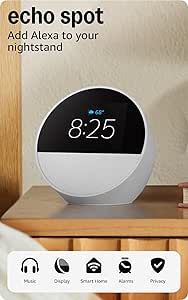 | Best Smart Hub Pick | Size: 4.5″W x 4.1″D x 4.4″H | Weight: 14.3 oz | Display: 2.83-inch touchscreen, 240x320px | VIEW LATEST PRICE | See Our Full Breakdown |
More Details on Our Top Picks
LED Desk Lamp with Power Strip, 3 AC Outlets, 4 USB Ports
For a dorm desk that has to do everything at once, this lamp earns the top spot because it solves two problems in one footprint: lighting and outlet scarcity. With three AC outlets and four USB ports built into the base, it effectively replaces a separate power strip, which matters when a shared room offers maybe two wall sockets. Compared with the LiFMIRA Desk Lamp, which only carries two USB ports and no AC outlets, this model is the better hub for charging a laptop, phone, and fan simultaneously. Stepless dimming and adjustable color temperature cover late-night study sessions without waking a roommate. The tradeoff: it’s a corded, single-color (matte black) unit with no smart home integration, so if voice control or app scheduling matters, the Govee RGBIC lamp is the stronger pick.
Pros:- Built-in power strip with 3 AC outlets and 4 USB ports consolidates charging
- Stepless dimming and adjustable color temperature for any study or relaxation scenario
- Foldable, space-saving design fits cramped dorm desks
- Flicker-free LED reduces eye strain during long study sessions
Cons:- No smart home connectivity or app control
- Bulky base occupied with outlets eats into limited desk space
- Only available in matte black
Best for: Students with cramped desks and few wall outlets who want one device to handle lighting and charging for multiple gadgets
Not ideal for: Buyers who want voice control, app scheduling, or ambiance features — this lamp has zero smart home integration
- Light Source:LED (64 sources)
- Charging:3 AC outlets, 4 USB ports (2 USB-C)
- Controls:Push button, stepless dimming
- Extra Features:Memory function, timer, foldable design
- Power:Corded electric, 120V
- Dimensions:5.52″D x 3.74″W x 14.57″H
- Material:Aluminum
Our verdict“If your dorm desk doubles as a charging station, this is the single purchase that handles both jobs well.”
LED Desk Lamp with 10W Wireless Charging & Pen Holder
This lamp’s whole pitch is decluttering: a 10W wireless charging pad in the base means one fewer cable snaking across your desk, and the integrated pen holder keeps loose supplies contained. Compared with the LED Desk Lamp with Power Strip, it trades raw charging capacity (no AC outlets, no multi-device USB hub) for a cleaner, more minimal setup that suits a student who mainly needs their phone topped up while studying. Touch control and stepless dimming across three color modes cover the basics, though the lighting versatility is narrower than the LiFMIRA’s five color modes and ten brightness levels. The real friction point is the wireless pad itself — thick phone cases interfere with charging, and some devices won’t hit full speed without Qi EPP support. If you own a MagSafe-style case, expect occasional repositioning.
Pros:- 10W wireless charging eliminates a cable from the desk
- Integrated pen holder keeps small supplies organized
- Touch control with 3 color modes and stepless dimming
- Flicker-free, high-CRI LED that’s easy on the eyes
Cons:- Wireless charging unreliable through thick phone cases
- No AC outlets — can’t power a laptop or fan like the power-strip lamp
- Plastic build feels less premium than aluminum rivals
Best for: Students with Qi-compatible phones and thin cases who want a tidy, cable-free desk setup with bonus storage
Not ideal for: Anyone with a bulky phone case or a device lacking Qi wireless charging — the headline feature becomes dead weight
- Light Source:LED
- Charging:10W wireless charging pad
- Controls:Touch
- Lighting Modes:3 color modes, stepless dimming
- Power:Corded electric, 8W, 120V
- Extra Features:Pen holder
- Material:Plastic
Our verdict“A smart buy if your phone charges wirelessly and your case is slim; skip it otherwise.”
GHome WiFi Smart Plug with Alexa and Google Assistant
This is the cheapest possible on-ramp to a smart dorm. Plug it into a fan, coffee maker, or string lights, and suddenly a dumb appliance gains voice control, scheduling, and remote operation through Alexa or Google Assistant. Compared with the GHome Smart Plug Power Strip elsewhere in this roundup, the single-plug version costs far less and fits crowded outlets better, but you give up energy monitoring and six-outlet expansion — a fair trade for a first smart home purchase. Schedules are the killer feature for dorm life: have a fan kick on before you walk back from class, or lights turn off automatically at 2 a.m. The main catch is that it’s 2.4GHz WiFi only, which trips up campus networks and newer routers that default to 5GHz. It also can’t pair with Alexa or Google directly — the app setup is mandatory first.
Pros:- Voice control via Alexa and Google Assistant at a very low price
- Scheduling, timers, and group control for automating dumb appliances
- Sharing feature lets roommates control the same plug
- Quick, stable setup on compatible networks
Cons:- 2.4GHz WiFi only — incompatible with 5GHz-only networks
- Requires app setup before voice assistants will work
- Only one outlet, no energy monitoring like the GHome power strip version
Best for: First-time smart home users on a budget who want to add voice control and scheduling to one existing appliance
Not ideal for: Students on restrictive campus WiFi or 5GHz-only networks — setup may be impossible without a workaround
- Current Rating:10A
- Voltage:120V
- Wattage:1200W
- Compatibility:Alexa, Google Assistant, SmartThings
- Connectivity:Wi-Fi, Bluetooth (2.4GHz)
- Mounting:Plug-in, wall mount
Our verdict“The lowest-cost way to make one dorm appliance smart, provided your WiFi network cooperates.”
LiFMIRA Desk Lamp with 2 USB Charging Ports, Touch Control
Where the LED Desk Lamp with Power Strip goes big on charging and the wireless-charging lamp goes minimal, the LiFMIRA carves out the middle: the most lighting flexibility per dollar. Five color modes and ten brightness levels outclass both rivals’ dimming ranges, and the metal, powder-coated build feels sturdier than the plastic wireless-charging model. A 30-minute auto-off timer is a quietly useful dorm feature — fall asleep reading without leaving the light on all night — and the memory function recalls your last setting when you tap it back on. With a CRI of 90+, colors and textbooks look accurate rather than washed out. The limitations are straightforward: it needs a wall outlet, offers no smart home integration (the Govee handles that), and its two USB ports can’t match the power-strip lamp’s multi-device hub. This is lighting first, charging second.
Pros:- 5 color modes and 10 brightness levels — the widest lighting range in this lineup
- Two USB charging ports (USB-C and USB-A) built in
- Auto-off timer and memory function add everyday convenience
- High CRI (90+), glare-free light in a metal housing
Cons:- No smart home or app integration at all
- Only two USB ports — no AC outlets for larger devices
- Tethered to an outlet; strictly a desktop design
Best for: Budget-conscious students who prioritize precise lighting control and a durable build over smart features
Not ideal for: Anyone wanting voice control or app scheduling — this lamp is fully manual
- Power:12W LED
- Controls:Touch
- Lighting Modes:5 color modes, 10 brightness levels
- Charging:2 USB ports (USB-C and USB-A)
- Extra Features:30-min auto-off timer, memory function, CRI 90+
- Power Source:12V DC, corded
- Material:Metal, powder-coated finish
Our verdict“The best pure lighting value here, as long as smart features aren’t on your wishlist.”
Govee RGBIC Smart Table Lamp 2
Every other lamp in this roundup does work lighting; the Govee does personality. RGBICWW technology means multiple colors display on the lamp simultaneously — something single-tone white lamps like the LiFMIRA simply can’t do — and with 64+ preset scenes, 8 music sync modes, and DIY effects, it turns a dorm room into a mood-setting hub for movie nights and parties. More practically, its Matter support means it plays nicely with Alexa, Google Home, SmartThings, and Apple HomeKit, the broadest platform compatibility in this roundup, and the 2700K–6500K white range means it can still function as a legitimate reading light at 500 lumens. Compared with the Govee-style experience of the Hatch Restore 3, this costs far less, though it lacks sunrise alarm and sleep sound features. Note that app setup is required for features like pat-to-wake, and the corded design keeps it tethered to one spot.
Pros:- Works with Alexa, Google Home, SmartThings, and Apple HomeKit via Matter
- RGBIC multi-color effects with 64+ scenes and 8 music sync modes
- Pat-to-wake, timers, and schedules add real convenience
- 2700K–6500K tunable white still works for everyday reading
Cons:- 500 lumens is dim for serious task lighting
- App setup required before key features work
- Corded power limits where you can place it
Best for: Students who want app and voice-controlled color ambiance for gaming, music, and movie nights on any smart platform
Not ideal for: Anyone wanting a pure task lamp or sleep-focused features — this is an ambiance device first, and the Hatch Restore 3 covers sleep better
- Brightness:500 lumens
- Color Temperature:2700K–6500K tunable white plus RGBIC color
- Platforms:Alexa, Google Home, SmartThings, Apple HomeKit via Matter
- Scenes:64+ preset scenes
- Music Sync:8 modes
- Extra Features:Pat-to-wake, timers, schedules, DIY effects
- Power Source:Corded electric
Our verdict“The pick for making a dorm room feel like your own — just don’t expect it to replace a proper study lamp.”
Levoit Vital 100S-P Air Purifier
Dorm air is rarely clean air, and this is where the Levoit Vital 100S-P earns its spot while the other picks in this roundup can’t help. It covers rooms up to 222 sq. ft. — enough for a typical dorm — and swaps air nearly five times per hour at that size, so it actually keeps pace with dust, dander from a secret pet, and hallway smells. The washable pre-filter matters more than it sounds on a student budget, since the part that clogs fastest is free to rinse and reuse. Compared with the Hatch Restore 3, which improves how you sleep, this one improves the air you’re sleeping in — the two pair well but solve different problems. The tradeoff is recurring filter costs after the pre-filter, and Levoit is vague about replacement intervals, so budget accordingly.
Pros:- 99.97% filtration of 0.1-0.3μm particles including dust, dander, and smoke
- Sleep Mode runs as low as 25dB, quiet enough for light sleepers
- Washable pre-filter cuts long-term maintenance costs
- VeSync app and voice assistant control work hands-free from bed
Cons:- Replacement filter costs and intervals are not clearly documented
- Only covers about 222 sq. ft., so larger shared suites won’t get full purification
Best for: Students with allergies, asthma, or a roommate who sheds (pets, clothes, snacks) in a room up to 222 sq. ft.
Not ideal for: Anyone who wants zero ongoing costs — replacement filters are a recurring expense with no clearly stated lifespan.
- Coverage Area:up to 222 sq. ft.
- Air Changes per Hour:4.8x in 222 sq. ft.; once in 1,073 sq. ft.
- Filtration Efficiency:99.97% for 0.1-0.3μm particles
- Noise Level:as low as 25dB in Sleep Mode
- Pre-Filter:Washable
- Filter Options:HEPA, Toxin Absorber, Smoke Remover, Pet Allergy
- Control:VeSync app, voice assistant compatible
Our verdict“Buy this if dorm air quality is your top complaint; skip it if you’re already spending your budget on lighting or alarms.”
Hatch Restore 3 Sunrise Alarm Clock & Sound Machine
The Hatch Restore 3 is the wellness pick of this lineup, aimed at the student whose 8 a.m. lecture is a daily battle. Unlike the Echo Spot, which wakes you with an alarm and a screen full of information, the Restore wakes you with a gradual sunrise simulation designed to feel less like a fire alarm and more like morning. Its customizable light and sound library is the core appeal — wind-down routines, white noise to mask a snoring roommate, and a glow that doubles as a reading light. The real tradeoff is the paywall: after the 30-day trial, premium content costs $5.99/month or $59/year, which adds up fast on a student budget. Compared with the Govee lamp, which offers color for mood, this offers color with a purpose — but only some of it is free.
Pros:- Sunrise alarm wakes you gradually instead of with a jarring tone
- Customizable light colors and sound library mask noisy roommates
- Doubles as a bedside reading lamp, replacing a second gadget
- 30-day free trial lets you test premium content before paying
Cons:- Full feature access requires a $5.99/month or $59/year subscription
- Premium price for what is functionally an alarm clock at its core
Best for: Light-sensitive sleepers and heavy sleepers who want a gentler wake-up and a shared-room-friendly wind-down routine.
Not ideal for: Budget-conscious students who won’t tolerate a subscription — the best features sit behind a monthly paywall.
- Color:Putty
- Functions:Sunrise alarm, sound machine, smart light
- Subscription Cost:$5.99/month or $59/year
- Trial Period:30 days free
- Customization:Adjustable light color, brightness, and audio routines
Our verdict“Worth it if sleep quality is your priority and you’ll actually pay for the subscription; the Echo Spot is the smarter buy if you just need an alarm.”
GHome Smart Plug Power Strip with 6 Outlets & 3 USB Ports
Dorms never have enough outlets, and the GHome Smart Power Strip attacks that problem directly while adding brains. Six individually controllable outlets plus three USB ports (including a 30W USB-C) replace a tangle of separate smart plugs — the single-outlet GHome Smart Plug elsewhere in this roundup makes sense for one lamp, but at scale this strip wins on value and desk real estate. The energy monitoring is genuinely useful for students watching electricity costs or curious about how much their mini fridge actually draws. Scheduled shutdowns mean the coffee maker or fan never stays on overnight. The compromises: it’s limited to 2.4GHz WiFi, which trips up some campus networks, and the 1,800W ceiling rules out high-draw appliances like space heaters — which most dorms ban anyway.
Pros:- Six outlets each controllable independently via app or voice
- Built-in energy monitoring tracks real power costs
- 30W USB-C port fast-charges phones and tablets without a brick
- Surge protection and safety certifications for peace of mind
Cons:- 2.4GHz-only WiFi can conflict with restrictive campus networks
- 1,800W / 15A cap excludes high-power appliances
Best for: Students with many devices and few outlets who want per-device control, scheduling, and charging from one hub.
Not ideal for: Anyone on a campus network that restricts 2.4GHz IoT devices — setup will be a frustrating dead end.
- Outlets:6 individually controllable
- USB Ports:3 (2 USB-A, 1 USB-C at 30W)
- Max Power:1800W / 15A
- Cord Length:184cm (220cm total)
- WiFi:2.4GHz only
- Features:Energy monitoring, scheduling, surge protection
- Compatibility:Alexa, Google Home
Our verdict“The most practical buy in this roundup for gadget-heavy desks — one strip replaces six smart plugs and a charger.”
Echo Spot (Newest Model) Smart Alarm Clock with Alexa
The Echo Spot is the command center option — the one gadget here that controls all the others. Where the GHome Smart Power Strip manages outlets and the Hatch Restore 3 manages sleep, the Spot’s built-in Alexa becomes the voice layer tying lamps, plugs, and routines together from a 2.83-inch touchscreen on your nightstand. Its surprise flex is the built-in eero Wi-Fi extender covering up to 1,000 sq. ft., which can fix dead-zone WiFi in older dorm buildings — though only if you already have a compatible eero router. Dual-band WiFi support also means it connects where 2.4GHz-only devices like the GHome strip sometimes fail. The speaker is genuinely good for its size, and there’s no camera, which is a real plus in shared spaces. The drawback: a small screen and one speaker make it a hub, not a media center.
Pros:- Alexa controls every other smart device in this roundup by voice
- Built-in eero extender covers up to 1,000 sq. ft. of extra WiFi
- Dual-band WiFi connects reliably where 2.4GHz-only devices fail
- No camera, plus a physical mic-off button for privacy
Cons:- Wi-Fi extender only works with a compatible eero router
- Small screen and single speaker limit it as an entertainment device
Best for: Students building a multi-device smart dorm who want one voice-controlled hub that also fixes spotty WiFi.
Not ideal for: Privacy-averse users who don’t want an always-listening mic in the bedroom — the off button exists, but the tradeoff is real.
- Size:4.5″W x 4.1″D x 4.4″H
- Weight:14.3 oz
- Display:2.83-inch touchscreen, 240x320px
- Speaker:1.73-inch full-range driver
- WiFi:Dual-band 802.11a/b/g/n/ac (2.4 and 5 GHz)
- eero Built-in:Extends coverage up to 1,000 sq. ft.
- Privacy:Mic off button, no camera, in-app controls
- Materials:36% recycled materials
Our verdict“Buy this first if you’re building a whole smart dorm — it’s the hub that makes every other pick here easier to use.”
How We Picked
I evaluated each gadget through the specific constraints of dorm life: footprint (does it earn its desk or nightstand space?), outlet independence (dorms have notoriously few plugs, so devices that add outlets outrank ones that consume them), and setup friction (anything requiring drilling, rewiring, or a hub was penalized). Price-per-function mattered too — a student spending $200 on one gadget needs it to replace several, while a $15 plug only needs to do one thing reliably.
I also weighed wireless dependency, since dorm Wi-Fi networks often block device pairing or require browser login, and move-out portability, since every pick needs to survive a car ride home each spring. Products were ranked by how completely they solve a real dorm problem, not by spec sheets — which is why a humble power-strip lamp outranks flashier smart displays for most students.
Factors to Consider When Choosing Smart Home Dorm Room Gadgets
Before clicking buy on any of these gadgets, think through how your specific dorm situation shapes what’s worth the money. These are the factors that most often make or break a dorm tech purchase.Outlet Real Estate Is Your Scarcest Resource
Most dorm rooms offer two to four wall outlets total, and some universities ban power strips without surge protection — which is why surge-protected smart strips like the GHome are a safer bet than cheap dumb strips. Before buying, count your actual devices and map where outlets sit relative to your bed and desk. Gadgets that add outlets (the top-ranked lamp, the smart power strip) instantly outperform gadgets that merely occupy one. A common mistake is buying several single-purpose devices that each eat an outlet, leaving you worse off than when you started. If your room has an outlet behind a bunk or lofted bed, prioritize long-cord options or smart plugs you can control without physical access.
Dorm Wi-Fi Can Break Smart Features
Campus networks frequently use enterprise security (WPA2-Enterprise, captive portal logins) that cheap smart home devices can’t handle — they expect home-grade Wi-Fi with a simple password. Before investing in Wi-Fi-dependent picks like the GHome plugs or Echo Spot, check whether your school allows devices on the main network or offers a separate IoT/gaming network. Some students solve this with a travel router, which adds $40–60 to the true cost of “smart” anything. If your network is locked down, the dumb-but-reliable picks (the LiFMIRA touch lamp, the Levoit purifier) lose nothing. Bluetooth-only control, like the Govee lamp’s fallback, can also work when full Wi-Fi pairing fails.
One Multipurpose Device vs. Several Specialists
The biggest structural decision in this category: buy a $50 lamp that also charges your phone and holds your pens, or buy a $20 lamp plus a $15 charger plus a $5 organizer. Multipurpose devices win on desk space and outlet count but lose if one function fails — a broken charging base takes down your lamp too. Specialists are easier to upgrade or replace individually, which matters when a roommate borrows things. My rule of thumb: multipurpose for the functions you use hourly (lighting, charging), specialists for functions you use daily-but-briefly (alarm clocks, air purification). Students who move rooms mid-year also appreciate specialists, since they reconfigure more flexibly.
Quiet Hours and Shared-Space Etiquette
Anything with a speaker, voice assistant, or bright display can become a roommate conflict — the Echo Spot’s microphone and screen are genuinely divisive in shared rooms. Look for physical mic shut-off switches and automatic do-not-disturb scheduling, which both the Echo Spot and Hatch Restore 3 handle well. The Levoit purifier runs at night, so check decibel ratings on its sleep mode; anything above ~25 dB is audible in a silent dorm. If your roommate sleeps at a different schedule, the Hatch’s gradual sunrise (light-based rather than sound-based) wakes you with far less collateral noise than any alarm speaker. Also remember thin dorm walls carry voice assistant responses, so adjust volume defaults on day one.
Budget Tiers: What $20, $60, and $170 Actually Get You
Under $25, you’re buying convenience: a smart plug that makes a fan or lamp voice-controlled, or a basic lamp upgrade. The $40–70 range is where dorm value peaks — the power-strip lamp, the Govee RGBIC, and the smart power strip all live here and each replaces multiple purchases. Above $130, you’re buying lifestyle rather than utility: the Hatch Restore 3 and Echo Spot improve how you sleep and wake rather than solving a physical problem. That premium tier only makes sense if sleep struggles are already hurting your grades, since a single bad semester costs far more than a sunrise alarm. A common overspend mistake is buying the premium sleep gadget first, before knowing whether your actual problem is light, noise, or schedule discipline.
Portability and Move-Out Survival
Every gadget here needs to survive at least eight moves over four years, so build quality and packed size matter more than most students expect. Glass-dome lamps and brittle plastic bases are the first casualties of a car trunk; the LiFMIRA’s simple construction and the Govee’s compact size travel well. Detachable cords are a quiet advantage — the Echo Spot and Levoit both pack down smaller than their footprints suggest. Check warranty terms too, since brands like Levoit and Govee offer replacement-friendly policies that matter when a power surge or dropped box kills a unit mid-semester. Anything bolted or semi-permanent violates most housing agreements anyway, so if it can’t move, don’t buy it.
Frequently Asked Questions
Are smart plugs allowed in dorm rooms?
Most universities allow smart plugs, but policies vary on the power strips they plug into — many schools require surge-protected strips and ban daisy-chaining. The GHome smart power strip sidesteps this ambiguity by being a surge protector itself, which is why it ranks above the single plug for cautious buyers. Check your housing handbook for wording about “UL-listed” requirements, since unlisted cheap strips are the usual target of bans. Also confirm your school’s policy on devices that stay powered 24/7, which occasionally trips fire-safety rules during inspections. If anything is unclear, a plug with a physical on/off switch gives inspectors an easy answer.
Will the Echo Spot or smart plugs work on campus Wi-Fi?
It depends entirely on your school’s network type. If your dorm uses a simple WPA2 password like a home router, everything here pairs normally. If it uses enterprise login (username plus password through a browser), most budget smart plugs and the Echo Spot will fail to connect unless your school offers a dedicated IoT network. Many campuses now provide one — search your IT department’s help pages for “smart home” or “gaming devices.” The workaround is a travel router that creates a private network from an Ethernet jack, but that adds cost and another device to manage. Bluetooth-controlled options like the Govee lamp keep working regardless, which is worth knowing before you build your whole room around Wi-Fi devices.
Is the Hatch Restore 3 worth it over just using my phone alarm?
If you wake up fine to a phone alarm, no — save the $170 and spend it on the power-strip lamp plus smart plugs, which solve physical problems instead. The Hatch earns its price for students who already struggle with groggy mornings, irregular sleep schedules, or falling asleep in a noisy dorm, because it attacks all three with sunrise simulation, a wind-down light routine, and a library of white noise. It also removes your phone from the bedtime equation, which for many students is the real upgrade — no doom-scrolling at 1 a.m. The Echo Spot covers some of the same ground for less money, but its screen is a temptation the Hatch deliberately avoids. Treat the Hatch as a sleep tool you commit to, not a gadget you try once.
Do I need both a desk lamp and a bedside lamp in a dorm?
You don’t, and in most dorm rooms you physically can’t fit both comfortably — which is why the rankings favor lamps that pull double duty. The top-ranked power-strip lamp anchors a desk setup and handles charging, while the Govee RGBIC covers bedside ambiance and wind-down lighting. What actually matters is light separation: a bright task light for studying and a warm dim light for pre-sleep, especially if your roommate keeps different hours. If your desk sits next to your bed (common in doubles), one well-placed multipurpose lamp plus a smart bulb in an existing fixture covers both zones for less than two dedicated lamps. Students in lofted-bed setups should bias toward a small bedside pick instead, since climbing down to kill the lights gets old fast.
Is an air purifier actually necessary in a dorm, or is it a luxury?
It sits somewhere between, but leans toward necessary in specific situations: shared air in older buildings, allergy or asthma sufferers, rooms that faced renovation dust, or any dorm with accumulated decades of unknown particulates. The Levoit earns its spot here because dorm air quality genuinely affects sleep and focus, and its washable pre-filter keeps ongoing costs near zero — a real advantage for students who won’t buy replacement filters. If you’ve never noticed dust, smells, or morning congestion in your room, spend the money on lighting or charging instead. Run it continuously on low rather than high; quiet continuous filtration beats loud intermittent bursts in a room where you sleep and study. Pet owners sneaking animals into dorms (you know who you are) should consider it non-negotiable.
Conclusion
For best overall, the LED Desk Lamp with Power Strip is the pick I’d point most students toward — it solves the outlet shortage, lights your desk, and charges everything for under $50, which no other option matches on value-per-square-inch. For best value, the GHome Smart Plug Power Strip turns six devices smart with energy monitoring for about the cost of a pizza night. The Hatch Restore 3 is the best premium choice for students whose real problem is sleep, not gear. For beginners dipping a toe into smart home tech, the single GHome WiFi Smart Plug is the lowest-risk, lowest-cost starting point, while the Echo Spot suits students who want a full voice assistant hub and don’t mind a screen on the nightstand. Specific needs: the Govee RGBIC for room ambiance, the wireless-charging lamp for cable-haters, and the Levoit purifier for anyone breathing questionable dorm air. Whatever you choose, start with the gadget that fixes your most frequent daily annoyance — that’s the one you’ll still be glad you bought in May.
Fall yard work Picks
leaf blowers
As an affiliate, we earn on qualifying purchases.