Smart plugs with energy monitoring do more than turn appliances on and off remotely — they show you exactly how much power each device consumes, which is how you find the energy hogs hiding on your electricity bill. After comparing 11 leading options, the TP-Link Tapo P110M 4-Pack stands out as my best overall pick, thanks to its Matter compatibility, reliable energy tracking, and polished Tapo app. The Govee 4-Pack is the better value if you want monitoring on a budget, while the Emporia 4-Pack is the strongest choice for data lovers who want detailed cost breakdowns and even whole-home energy analysis. The main tradeoff in this category is between app quality and price: name-brand plugs like TP-Link and Kasa offer smoother software and longer firmware support, while budget brands cut corners on responsiveness and reporting resolution. Keep reading for the full breakdown, including which plugs are best for beginners, heavy 15A appliances, and Matter-enabled smart homes.

Get home appliances delivered free — and shop member deals
- Fast, free delivery on millions of items
- Access to Prime Big Deal Days deals on October 6–7
- Prime Video, Amazon Music and more included
Complete the kit


Key Takeaways
- TP-Link‘s ecosystem (Tapo P110M, P115, and Kasa KP115/KP125M) dominated the top of the ranking because its app presents energy data more clearly than any budget competitor — hourly, daily, and monthly views are standard across the lineup.
- Matter support is the biggest differentiator among otherwise similar plugs: the Tapo P110M and Kasa KP125MP2/MP4 work natively with Apple Home and other Matter platforms, while budget picks like the AiSeek and Govee lock you into Alexa, Google Home, or a proprietary app.
- Budget 4-packs (AiSeek, THIRDREALITY) can cost roughly half of what name-brand multi-packs run, but their energy readings often update less frequently and their apps bombard you with notifications — fine for casual monitoring, weak for serious tracking.
- The Emporia plug is the only option here that connects to a broader whole-home energy monitoring system, making it uniquely suited to buyers who want per-outlet data integrated with utility-bill-level analysis.
- All 11 plugs require 2.4 GHz Wi-Fi and cap out at 15A, so none should be paired with space heaters, hair dryers, or other appliances that surge past 1,800 watts — a common and potentially unsafe mistake.




| smart plugs with energy monitoring | Connectivity | Pack size | Model |
|---|---|---|---|
| THIRDREALITY Smart Plug Gen3 | Zigbee 3.0 | 4 plugs | — |
| Govee Smart Plug with Energy M | Wi-Fi and Bluetooth | 4 plugs | — |
| AiSeek Smart Plug with Energy | 2.4 GHz Wi-Fi | 4 plugs | — |
| TP-Link Tapo P115 Smart Plug | Wi-Fi (2.4 GHz) | 2 plugs | Tapo P115 |
| Kasa Matter Smart Plug with En | Wi-Fi, Matter | 2 plugs | KP125MP2 |
| Tapo P110M Smart Plug | Matter certified, Wi-Fi | 4 plugs | Tapo P110M |
| Kasa Smart Plug Mini with Ener | 2.4 GHz Wi-Fi | — | Kasa KP115 |
| TP-Link Tapo P115 Smart Plug W | Wi-Fi | 4 plugs | Tapo P115 |
| Emporia Energy Monitoring Smar | — | — | — |
| AiSeek Pro Energy Monitoring S | Wi-Fi 2.4 GHz, Bluetooth | — | — |
| Kasa Matter Smart Plug with En | Wi-Fi, Matter | — | KP125MP4 |
More Details on Our Top Picks
THIRDREALITY Smart Plug Gen3, 4-Pack
Most plugs in this roundup lean on Wi-Fi, but the THIRDREALITY Gen3 takes the Zigbee route — and that changes the entire ownership experience. Zigbee plugs don’t saturate your router with devices, and each plug doubles as a mesh repeater, strengthening your network the more you add. The stated ±1% power monitoring accuracy is also tighter than what most Wi-Fi competitors advertise, including the Govee 4-pack, which doesn’t publish an accuracy figure at all. This option makes the most sense for anyone already running Home Assistant, Hubitat, or SmartThings, where plug-and-play local control beats cloud-dependent apps like SmartLife on the AiSeek plugs. The tradeoff is real, though: without a Zigbee hub, these are expensive paper weights, and power restoration after an outage only works on select platforms.
Pros:- Zigbee mesh repeating strengthens your smart home network as you add plugs
- Stated ±1% power monitoring accuracy leads this lineup
- Broad hub compatibility including Home Assistant, Hubitat, and SmartThings
- Space-saving housing avoids blocking adjacent sockets
Cons:- Requires a compatible Zigbee hub to function at all
- Power-on state restoration only works on select platforms
Best for: Smart home hobbyists with a Zigbee hub (Home Assistant, Hubitat, SmartThings) building a large, locally controlled setup
Not ideal for: Buyers without an existing Zigbee hub — the extra hardware cost defeats the value of a 4-pack
- Pack size:4 plugs
- Connectivity:Zigbee 3.0
- Operating voltage:110 V
- Power monitoring accuracy:±1%
- Operation mode:On-off
- Control methods:Remote, voice
- Hub required:Yes
Our verdict“If you already run a Zigbee hub, this is the most accurate and most scalable energy-monitoring pick here — everyone else should stick with Wi-Fi options.”
Govee Smart Plug with Energy Monitoring, Wi-Fi and Bluetooth, 4-Pack
Where the Govee 4-pack pulls ahead of similarly priced rivals is data retention. It tracks power, current, and voltage and keeps up to one year of history in the Govee Home app — far longer than the Tapo P115 offers, which makes it the better tool for spotting seasonal drift in an appliance’s consumption, like a fridge working harder in summer. Bluetooth pairing also simplifies setup compared with Wi-Fi-only plugs like the AiSeek, which can be fussy during first-time connection. Compared with the THIRDREALITY Gen3, you give up mesh networking and stated accuracy figures, but you gain hub-free simplicity and ETL certification with fire-resistant housing. The one recurring frustration is the 2.4 GHz-only Wi-Fi limitation, which trips up households running combined-band networks.
Pros:- Up to one year of historical energy data — the longest retention in this lineup
- Tracks power, current, and voltage simultaneously
- ETL and FCC certified with fire-resistant construction
- Bluetooth pairing makes initial setup faster than Wi-Fi-only rivals
Cons:- No 5 GHz Wi-Fi support
- No published accuracy spec for its monitoring readings
Best for: Data-driven homeowners who want long-term usage trends for appliances like fridges, dehumidifiers, or space heaters
Not ideal for: Households with 5 GHz-only networks or mesh routers that complicate 2.4 GHz device pairing
- Pack size:4 plugs
- Connectivity:Wi-Fi and Bluetooth
- Wi-Fi compatibility:2.4 GHz only
- Energy monitoring:Power, current, and voltage
- Data history:Up to 1 year
- Voice assistants:Amazon Alexa, Google Assistant
- Certifications:ETL, FCC
Our verdict“This is the pick when the goal is analyzing months of consumption trends, not just glancing at today’s usage.”
AiSeek Smart Plug with Energy Monitoring, 15A, 2.4 GHz Wi-Fi, 4-Pack
Four plugs, real-time energy readings, group control, and no hub required — the AiSeek 4-pack covers the fundamentals that matter most for the least complexity. Its short-circuit and overload protection plus fire-resistant housing give it credible safety credentials, and the compact body leaves adjacent outlets free, matching the space efficiency of the Kasa KP125MP2. That said, this model makes clear compromises to hit a budget tier. Voice control only works through the SmartLife app as a middleman, rather than the direct Alexa link you get with the Tapo P115, and there’s no equivalent of the P115’s smart charging or auto-shutoff features. Compared with the Govee pack, historical data is shallower too. This pick makes the most sense when the priority is simply monitoring several outlets at once without extra hardware or a steep learning curve.
Pros:- Real-time energy monitoring with no hub required
- Compact design leaves adjacent outlets accessible
- Fire-resistant materials with short-circuit and overload protection
- Group control manages multiple plugs simultaneously
Cons:- Voice control requires routing through the SmartLife app — no direct Alexa connection
- 2.4 GHz Wi-Fi only
- Shallower data history than the Govee alternative
Best for: First-time smart plug buyers who want basic energy tracking across multiple outlets at minimal cost
Not ideal for: Power users who want deep platform integration or advanced automation — SmartLife’s limitations will frustrate them
- Pack size:4 plugs
- Max current:15A
- Max power:1800W
- Connectivity:2.4 GHz Wi-Fi
- App:SmartLife
- Hub required:No
- Voice control:Alexa, Google Assistant via SmartLife app link
- Certification:FCC
Our verdict“A sensible entry point for outfitting several outlets with energy monitoring, as long as app-mediated voice control doesn’t bother you.”
TP-Link Tapo P115 Smart Plug (2-Pack), Wi-Fi, 15A with Energy Monitoring
Two features set the Tapo P115 apart from everything else here. First, smart charging: set a battery limit and the plug cuts power when a device reaches it, sparing phone and e-bike batteries from overnight trickle damage — something no other plug in this batch offers. Second, auto-shutoff guards against overload, a protection layer the AiSeek matches but the Govee doesn’t advertise. The Tapo app turns raw readings into usage charts and billing estimates, making it easier to act on the data than Govee’s raw current-and-voltage feed. The catch is the 2-pack format: outfitting a whole home costs more per outlet than the AiSeek or Govee 4-packs, and it’s still a 2.4 GHz-only Wi-Fi device with no Matter support, unlike the Kasa KP125MP2. For two carefully chosen outlets rather than blanket coverage, this model earns its place.
Pros:- Smart charging stops power at a set battery limit to prevent overcharging
- Auto-shutoff protects against electrical overload
- Usage charts and billing estimates make data actionable
- Direct Alexa and Google Assistant integration without app workarounds
Cons:- Only 2 plugs per pack — higher cost per outlet than 4-pack rivals
- 2.4 GHz Wi-Fi only, with no Matter cross-platform support
Best for: Owners of rechargeable devices — phones, e-bikes, power tool batteries — who want overcharge protection plus polished analytics
Not ideal for: Buyers covering many outlets on a budget — the 2-pack format costs more per plug than the 4-pack alternatives
- Model:Tapo P115
- Pack size:2 plugs
- Max current:15A
- Connectivity:Wi-Fi (2.4 GHz)
- Energy monitoring:Yes, with charts and billing estimates
- Smart charging:Yes, cutoff at set battery limit
- Auto-shutoff:Yes
- Voice assistants:Alexa, Google Assistant
Our verdict“The most feature-rich energy monitor in this lineup — pick it for the outlets where smart charging and auto-shutoff genuinely matter.”
Kasa Matter Smart Plug with Energy Monitoring (KP125MP2)
The Kasa KP125MP2 is the only plug in this lineup built on Matter, which means it speaks natively to Apple Home, Alexa, Google Home, and SmartThings without favoring any one of them — a real advantage if your household mixes ecosystems or might switch later. Its local LAN control is the other standout: unlike the cloud-dependent AiSeek or Govee plugs, these keep responding to commands when the internet drops. Compared with its sibling Tapo P115, the Kasa trades the smart-charging feature for broader platform reach and a UL-certified flame-retardant housing backed by a 2-year warranty. Drawbacks exist: full Matter integration assumes you have a compatible controller, and the 15A/1800W ceiling rules out high-draw appliances like some heaters or power tools — the same limit shared by every plug here, but worth stating plainly.
Pros:- Matter certification works natively with Apple Home, Alexa, Google Home, and SmartThings
- Local LAN control keeps working during internet outages
- UL-certified flame-retardant housing with 2-year limited warranty
- Compact design doesn’t block adjacent outlets
Cons:- Full smart home integration requires a Matter-compatible hub or controller
- Capped at 15A/1800W — unsuitable for high-power appliances
Best for: Multi-ecosystem households, especially Apple Home users, who want one plug that works everywhere and survives internet outages
Not ideal for: Buyers with high-power appliances exceeding 15A/1800W, or those without a Matter controller for full integration
- Model:KP125MP2
- Pack size:2 plugs
- Max current:15A
- Max power:1800W
- Connectivity:Wi-Fi, Matter
- Compatible platforms:Apple Home, Alexa, Google Home, SmartThings
- Energy monitoring:Yes
- Certification:UL certified flame retardant
- Warranty:2-year limited
Our verdict“The safest long-term choice for mixed-platform households that value future-proofing and offline reliability over niche features.”
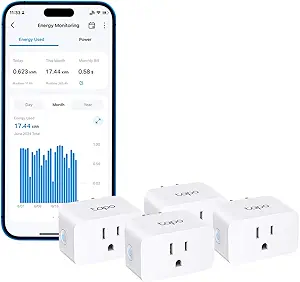
Tapo P110M Smart Plug (4-Pack), Matter Compatible, Energy Monitoring, 15A
If your household mixes an Apple Home setup in one room and Alexa in another, Matter certification is the feature that settles the decision. The Tapo P110M is the only plug in this lineup that speaks natively to Apple HomeKit and Samsung SmartThings alongside Alexa and Google Home, where options like the Kasa KP115 and Tapo P115 stop at Alexa and Google. Its energy dashboard goes beyond raw numbers, translating consumption into bill estimates so off-peak scheduling actually maps to dollars. Safety logic is thoughtful too: power cutoffs trigger at user-set thresholds, which is handy for charging devices overnight. The tradeoff is friction — the richest monitoring features still live in the Tapo app rather than your native home app, and some integrations demand a Matter-capable hub.
Pros:- Matter-certified for native compatibility across Apple HomeKit, Alexa, Google Home, and SmartThings
- Energy monitoring with cost visualization and bill estimation, not just raw kWh
- Programmable off-peak scheduling to shift usage to cheaper rate windows
- Overcharge prevention and overcurrent protection with automatic power cutoffs
Cons:- Full energy feature set still requires the Tapo app rather than native platform apps
- Some integrations require a Matter-compatible hub, adding cost for basic setups
Best for: Households running mixed smart home platforms (Apple Home, Alexa, Google, SmartThings) who want one plug that works everywhere
Not ideal for: Buyers with a single-assistant setup and no Matter hub — cheaper plugs like the KP115 deliver the same core monitoring for less complexity
- Model:Tapo P110M
- Pack Size:4 plugs
- Max Current:15A
- Connectivity:Matter certified, Wi-Fi
- Compatible Platforms:Amazon Alexa, Apple HomeKit, Google Home, Samsung SmartThings
- Voice Control:Alexa, Google Assistant
- App:Tapo app
Our verdict“The pick for multi-platform households that refuse to lock into one ecosystem, provided they’re willing to manage settings through the Tapo app.”
Kasa Smart Plug Mini with Energy Monitoring (KP115)
What separates the Kasa KP115 from flashier options like the Tapo P115 isn’t feature count — it’s the safety engineering and support behind it. This is the plug I’d point to for appliances that run unattended, thanks to overheating protection, a fire-resistant shell, and a sliding safety cover that keeps dust and little fingers out of unused outlets. UL certification and a two-year warranty back that up, and few competitors in this roundup offer either. Energy monitoring is present but more basic than Tapo’s chart-heavy dashboards — you get usage data without bill projections or smart-charging cutoffs. It also skips HomeKit and SmartThings entirely. Still, for buyers who prioritize trustworthy hardware over ecosystem breadth, this model holds up where budget plugs cut corners.
Pros:- UL certification with a two-year warranty for accountability
- Overheating protection and fire-resistant housing
- Sliding safety cover protects unused outlets
- Reliable remote control through the mature Kasa app
Cons:- Energy monitoring is more basic than Tapo’s, without cost estimates or smart charging
- 2.4 GHz-only Wi-Fi with no Apple HomeKit or SmartThings support
Best for: Buyers plugging in space heaters, dehumidifiers, or other unattended appliances who want certified safety hardware and warranty backing
Not ideal for: Apple Home users or anyone wanting bill estimates and advanced energy dashboards — this stick to Alexa and Google basics
- Model:Kasa KP115
- Connectivity:2.4 GHz Wi-Fi
- Energy Monitoring:Yes
- Voice Assistants:Amazon Alexa, Google Assistant
- Safety Features:Overheating protection, fire-resistant shell, sliding safety cover
- Certification:UL certified
- Warranty:2 years
Our verdict“The safest bet in this lineup for unattended appliances, trading dashboard depth for certified build quality and warranty peace of mind.”
TP-Link Tapo P115 Smart Plug Wi-Fi with Energy Monitoring (4-Pack), 15A
Where the Emporia plug treats energy monitoring as the main event, the Tapo P115 pairs its detailed usage charts with the automation tools that actually change behavior. The standout is smart charging: set a battery percentage ceiling and the plug cuts power automatically, protecting devices left on chargers — a feature Emporia and the AiSeek Pro don’t match. Add auto-shutoff on overload and programmable schedules, and this becomes the plug for running washers, EV chargers, or pool pumps during cheap overnight windows. The 15A rating handles heavier loads than Emporia’s 10A limit. Its weakness is ecosystem reach — no Apple HomeKit or SmartThings, unlike the Matter-certified Tapo P110M — and the best scheduling logic assumes you know your utility’s rate structure.
Pros:- Smart charging cuts power at a set battery limit to prevent overcharge
- Detailed energy charts and usage statistics presented clearly in the Tapo app
- Auto-shutoff guards against electrical overload on heavy loads
- 15A/1800W capacity suitable for larger appliances than 10A competitors
Cons:- Off-peak savings require manual setup against your utility’s rate schedule
- Requires the Tapo app for full functionality, with no HomeKit or SmartThings support
Best for: Homeowners who want to shift high-consumption appliances to off-peak hours and protect devices from overcharging
Not ideal for: Apple Home or SmartThings users — the P110M covers those platforms while this one stops at Alexa and Google
- Model:Tapo P115
- Pack Size:4 plugs
- Max Current:15A
- Connectivity:Wi-Fi
- Compatibility:Amazon Alexa, Google Assistant
- App:Tapo app
- Key Features:Energy monitoring, smart charging, auto-shutoff, scheduling
Our verdict“The strongest pick for buyers who want monitoring plus automation that saves money on schedule-driven appliances.”
Emporia Energy Monitoring Smart Plug (4 Pack) – WiFi Outlet with Timer
The Emporia 4-pack earns its spot by attacking a specific problem: vampire drain from electronics that sip power around the clock. Its per-plug real-time monitoring is designed to expose which devices quietly inflate your bill, and the app’s focus on standby waste makes it easier to act on than the raw statistics the AiSeek Pro reports. Integration with the broader Emporia ecosystem is a real advantage if you already track whole-home consumption with their energy monitor. But there’s a hard limit buyers must respect: at 1200W continuous (10A), it can’t safely run space heaters, microwaves, or hair dryers — the 15A Tapo P115 and P110M handle those loads without issue. Treat this as an electronics-and-lighting monitor, not an all-purpose plug.
Pros:- Real-time per-plug monitoring aimed squarely at standby power waste
- Pairs with Emporia’s whole-home energy ecosystem for a fuller picture
- Scheduling and timer features for automating lights, fans, and humidifiers
- Multiple control methods including app, voice, touch, and remote
Cons:- Limited to 10A/1200W continuous load, unsuitable for high-power appliances
- 2.4GHz Wi-Fi only, with no 5GHz support
Best for: Energy-conscious households auditing electronics clusters — entertainment centers, desks, and charging stations — for standby power waste
Not ideal for: Anyone running high-wattage appliances like heaters or kitchen equipment — the 10A/1200W ceiling rules them out
- Operating Voltage:120V
- Max Wattage:1200W (10A)
- Wi-Fi:2.4GHz only
- Control Methods:App, remote, touch, voice
- Compatible Assistants:Amazon Alexa, Google Assistant
- Operating Temperature:14°F – 140°F
- Quantity:4 pack
Our verdict“A focused tool for finding and eliminating phantom loads in electronics-heavy rooms — just don’t ask it to run anything demanding.”
AiSeek Pro Energy Monitoring Smart Plug Outlet, 15A 2.4 GHz Wi-Fi, 4-Pack
Most plugs in this roundup report wattage and call it a day. The AiSeek Pro surfaces power, voltage, current, and total kWh simultaneously, which matters if you’re diagnosing why a circuit trips or verifying whether an appliance is degrading — data the Kasa KP115 and Emporia don’t break out this granularly. Despite the budget positioning, it doesn’t skimp on the fundamentals: 15A/1800W capacity with overload protection, ETL and FCC certification, and a compact housing that leaves the second outlet free. The catch is software. Living inside the Tuya/Smart Life ecosystem means a less polished app experience than TP-Link’s, occasional cloud dependency, and no path to Apple Home. For detail-driven buyers willing to tolerate clunkier software, the trade is worth it.
Pros:- Monitors power, voltage, current, and cumulative kWh in real time
- Full 15A/1800W load capacity with overload protection
- ETL Listed and FCC certified with fire-retardant housing
- No hub required, and compact body doesn’t block adjacent outlets
Cons:- Depends on the Tuya/Smart Life app, which is less polished than Tapo or Kasa software
- 2.4GHz Wi-Fi only, with no HomeKit or SmartThings path
Best for: DIY-minded buyers and troubleshooters who want voltage and current readings per outlet, not just wattage totals
Not ideal for: Buyers who value app polish and long-term software support — TP-Link’s Tapo and Kasa apps are noticeably more refined
- Operating Voltage:120V
- Max Wattage:1800W (15A)
- Connectivity:Wi-Fi 2.4 GHz, Bluetooth
- Control Methods:App, push button, voice
- Certifications:ETL Listed, FCC Certified
- Compatible Apps:Tuya Smart, Smart Life
- Voice Assistants:Alexa, Google Assistant
- Quantity:4-pack
Our verdict“The pick for electrical detail on a budget — granular readings and full 15A capacity, as long as app polish isn’t a priority.”
Kasa Matter Smart Plug with Energy Monitoring (KP125MP4)
Matter support gives the KP125MP4 a wider smart-home fit than the Wi-Fi-focused Kasa KP115: it works with Apple Home, Alexa, Google Home, and SmartThings, while its energy monitoring helps identify which appliances draw power over time. Local LAN control can keep commands working during an internet outage, useful for households that want more than cloud-dependent switching. Its compact body is also less likely to occupy the neighboring outlet, and the 15A/1800W rating covers many everyday appliances.
The tradeoff is setup: full Matter functionality requires a compatible hub or controller, so this is less straightforward for someone who only wants a simple app-controlled plug. Compared with the Tapo P110M, it offers the Kasa app and local control, but buyers should check their existing hub before choosing either Matter option.
Pros:- Matter compatibility covers Apple Home, Alexa, Google Home, and SmartThings
- Energy monitoring tracks consumption over time
- Local LAN control can work during internet outages
- Compact design helps preserve access to adjacent outlets
Cons:- A Matter-compatible hub or controller is needed for full functionality
- Energy monitoring is limited to the connected plug rather than whole-home usage
Best for: Households using multiple smart-home platforms that already have a Matter-compatible hub and want plug-level energy tracking.
Not ideal for: Buyers without a Matter controller who want the simplest possible setup, or anyone seeking detailed whole-home energy analysis.
- Model:KP125MP4
- Maximum load:15A / 1800W
- Connectivity:Wi-Fi, Matter
- Compatible platforms:Apple Home, Amazon Alexa, Google Home, Samsung SmartThings
- Energy monitoring:Yes
- Local control:Local LAN control
- Certification:UL-certified flame-retardant design
- Warranty:2-year limited
Our verdict“Choose the KP125MP4 if you have a Matter controller and want energy tracking plus broad platform compatibility in a compact plug.”

How We Picked
I evaluated each plug against five criteria, weighted by what actually matters when energy monitoring is the reason you’re buying. Data quality and app usability carried the most weight — a plug is only as good as the software that displays its readings, so I favored apps with clear hourly, daily, and monthly breakdowns, real-time wattage updates, and estimated cost calculations over apps that bury numbers behind clunky menus. Smart home compatibility came next: plugs supporting Matter work across Apple Home, Google Home, and Alexa without cloud dependencies, which future-proofs the purchase.
From there I weighed multi-pack value (since most buyers are outfitting several outlets at once), hardware reliability including Wi-Fi connection stability and physical build, and setup experience for beginners. Products from established ecosystems ranked higher because firmware updates and app longevity matter more than a lower sticker price when the plug needs to stay accurate for years. Budget picks earned their spots by delivering acceptable monitoring performance at a meaningfully lower cost — not by matching premium features.
| smart plugs with energy monitoring | Model |
|---|---|
| THIRDREALITY Smart Plug Gen3 | — |
| Govee Smart Plug with Energy M | — |
| AiSeek Smart Plug with Energy | — |
| TP-Link Tapo P115 Smart Plug | Tapo P115 |
| Kasa Matter Smart Plug with En | KP125MP2 |
| Tapo P110M Smart Plug | Tapo P110M |
| Kasa Smart Plug Mini with Ener | Kasa KP115 |
| TP-Link Tapo P115 Smart Plug W | Tapo P115 |
| Emporia Energy Monitoring Smar | — |
| AiSeek Pro Energy Monitoring S | — |
| Kasa Matter Smart Plug with En | KP125MP4 |
Factors to Consider When Choosing Smart Plugs With Energy Monitoring
Energy-monitoring smart plugs look nearly identical in product photos, but the differences in accuracy, software, and platform support will determine whether you actually use the data or forget the feature exists. These are the factors I weigh before buying.App Quality Matters More Than Hardware
The physical plug is the simple half of the equation — the app is where you’ll live with your decision every day. Some manufacturers update readings only every few minutes, while others refresh real-time wattage continuously, and that difference determines whether you can catch a device’s power spike as it happens or only see averages hours later. Look for apps that convert watt-hours into estimated electricity costs by letting you enter your utility rate; raw kilowatt-hour numbers mean nothing until you can see what a device costs you per month. Also pay attention to how long the app retains history — some budget brands only keep 30 days of data, which makes seasonal comparisons impossible. Finally, check recent app store feedback for complaints about forced account creation, notification spam, or abandoned firmware, because those problems get worse after purchase, not better.
Matter vs. Cloud-Based Ecosystems
Matter support is the single biggest architectural choice you’ll make. A Matter-certified plug like the Tapo P110M or Kasa KP125M connects locally to Apple Home, Google Home, Alexa, and Samsung SmartThings, which means faster response times, better privacy, and functionality even if the manufacturer’s cloud goes down. Cloud-dependent plugs require an account with the manufacturer’s servers, adding latency and a real longevity risk — if the company discontinues the product line, your energy monitoring can stop working entirely. That said, Matter has a limitation many buyers miss: energy data does not always sync across platforms, so you may still need the manufacturer’s app to view detailed consumption even when the plug itself is controlled through Apple Home. Buyers heavily invested in a single ecosystem should verify the plug’s monitoring features work natively in their platform of choice, not just the on/off control.
Amperage Ratings and Realistic Power Limits
Nearly every plug in this category is rated for 15 amps, which translates to a theoretical maximum around 1,800 watts — but that number is misleading for anything with a motor or heating element. Refrigerators, dehumidifiers, and air conditioners draw inrush current at startup that can briefly double or triple their running wattage, stressing the plug’s relay over time. Resistive loads like space heaters are worse: they sit near the maximum continuously, and sustained high draw is the most common cause of smart plug failure. My rule of thumb is to keep continuous loads under about 1,200–1,500 watts and avoid heaters entirely. The irony is that the devices you most want to monitor — HVAC equipment and big appliances — are often the ones a small plug shouldn’t handle, so a monitoring smart plug is best paired with electronics, entertainment setups, and always-on phantom loads.
The Hidden Cost of Cheaping Out on Multi-Packs
Budget 4-packs are tempting because monitoring several outlets is the whole point, and the per-plug price difference compounds quickly. But the real cost of a cheap multi-pack shows up later: Wi-Fi disconnection bugs, plugs that fall off the network after router changes, energy readings that drift from reality, and apps littered with ads or upsells. If a plug drops its connection, its energy history develops gaps that quietly ruin your monthly data. Name-brand ecosystems also tend to support their hardware with firmware updates for five years or more, while some budget brands treat plugs as disposable. That doesn’t mean budget picks are never worth it — a guest room or laundry area where approximate data is fine is a perfectly reasonable place to save. The mistake is expecting $10-plug performance to match a mature ecosystem across your entire home.
2.4 GHz Wi-Fi and Network Compatibility
Every plug here requires a 2.4 GHz Wi-Fi connection, and this trips up more buyers than any other setup issue. Modern mesh routers often combine 2.4 GHz and 5 GHz bands under a single network name, and some plugs struggle to connect when the router pushes them toward the faster band. If setup fails repeatedly, temporarily creating a guest network set explicitly to 2.4 GHz solves the problem in most cases. Another consideration is distance: 2.4 GHz travels farther but congests easily, so a garage or outdoor-adjacent outlet may connect fine while a plug in a far corner of a large home struggles. Buyers with older routers, enterprise-grade access points, or networks that require browser-based captive portal authentication should double-check compatibility before buying any of these plugs, since none of them support Ethernet or Thread as a fallback.
What You Actually Want to Monitor
Before choosing, sketch out what you hope to learn from energy monitoring, because that answer changes the right pick. If the goal is finding phantom loads — the standby power drained by TVs, game consoles, and chargers — almost any monitoring plug works, since those loads are small but constant and easy to aggregate. If you’re tracking a specific expensive appliance like a chest freezer or dehumidifier, you want a plug with accurate low-wattage measurement and long data retention, which favors the established brands. And if you’re trying to understand your whole-home consumption, a per-outlet strategy only covers a fraction of your usage; a system like Emporia’s full monitoring kit, which pairs with their smart plugs, gives you circuit-level data that individual plugs can never provide. Matching the tool to the question is what separates a useful purchase from a drawer full of forgotten plugs.
Frequently Asked Questions
How accurate are smart plugs with energy monitoring compared to my utility meter?
Most quality smart plugs measure within about 1–3% of actual consumption, which is accurate enough for comparing devices and spotting waste, but not precise enough to replace your utility meter for billing purposes. Accuracy tends to suffer most at very low loads — a device drawing under one watt, like a phone charger in standby — where measurement resolution matters more than the sensor itself. Established brands like TP-Link and Kasa generally report more consistent readings across their product lines, while budget plugs occasionally show watt-hour totals that drift from measurements taken with a dedicated power meter. If precision matters to you, plug a known load like a 60-watt incandescent bulb into the plug and compare the reported wattage as a quick sanity check. Small discrepancies are normal; a reading that’s off by 20% or more suggests a defective unit worth returning.
Do Matter smart plugs show energy data in Apple Home or Google Home?
This is a common misconception worth clearing up: Matter standardizes on/off control and scheduling, but detailed energy reporting is still being rolled out across platforms, and support is uneven. In practice, most Matter plugs let you control them from Apple Home or Google Home while requiring the manufacturer’s own app — Tapo or Kasa, for example — to see the full consumption history and cost estimates. Google Home has added energy dashboard features for some devices, and Apple Home gained energy reporting capabilities in recent updates, but compatibility depends on the specific plug and firmware version. So a Matter plug is still a smart buy for future-proofing and local control, but don’t assume the monitoring feature will appear in your platform of choice on day one. Plan to keep the manufacturer’s app installed for the data side of things.
Can I use energy monitoring smart plugs with a space heater or air conditioner?
I’d be cautious here, and with air conditioners specifically, mostly no. Most of these plugs are rated for 15 amps, roughly 1,800 watts, and a window air conditioner or space heater can operate near or above that limit, with startup surges pushing motor-driven appliances even higher. Sustained high current overheats the plug’s internal relay, which degrades it over time and, in worst cases, creates a fire hazard — this failure mode is well documented with smart plugs generally. Space heaters in particular are the appliance most often blamed for smart plug meltdowns, and many manufacturers explicitly exclude them from warranty coverage. If you want to monitor a large appliance, either use a plug-rated relay device designed for heavy loads, or track the appliance at your electrical panel with a circuit-level monitor instead.
Is a 4-pack worth it, or should I buy a single plug to start?
For energy monitoring specifically, multi-packs make more sense than with ordinary smart plugs, because the value comes from comparing devices against each other — knowing your TV costs $2 a month means little until you can compare it to your game console, soundbar, and cable box. A 4-pack lets you audit an entire entertainment center or kitchen in one round, and the per-plug price usually drops by 30–50% versus singles. That said, there’s a case for starting with one plug from a reputable brand to test whether you actually engage with the data; plenty of buyers find the novelty wears off after two weeks. My suggestion is to start with a 4-pack from an ecosystem you’re confident in (Tapo or Kasa are the safest bets here), and skip the single-plug experiment unless you’re genuinely unsure the feature will hold your interest. What you want to avoid is mixing three different budget brands, since fragmented apps make the data harder to use.
Do these smart plugs still record energy data when the internet goes down?
It depends on the plug’s architecture, and this is where brand choice genuinely matters. Plugs that process data locally on the device — which includes most of the TP-Link and Kasa lineup — continue measuring consumption during an internet outage and sync the history to the app once connectivity returns, usually with only minor gaps. Cloud-dependent plugs from smaller brands may stop logging entirely during an outage, leaving permanent holes in your daily and monthly charts. Matter plugs used with a local hub like Apple Home maintain control even offline, though energy history still typically flows through the manufacturer’s app and cloud. If you live somewhere with flaky internet, this should weigh heavily in favor of the established brands in this lineup. Check whether the app shows continuous data after a known outage — gaps that line up exactly with your downtime tell you the plug wasn’t measuring locally.
Conclusion
For most buyers, the TP-Link Tapo P110M 4-Pack is the best overall choice — it combines Matter compatibility, dependable energy tracking, and the clearest app experience in this lineup, all at a fair per-plug price. If value is the priority, the Govee 4-Pack delivers solid monitoring for noticeably less, with the tradeoff of a less refined app and no Matter support. The Kasa KP125MP2 earns the premium slot for buyers deep in smart home ecosystems who want the most mature software and longest support runway, while the Kasa KP115 is the friendliest option for beginners dipping a toe into energy monitoring without extra features to configure. For specific needs: the Emporia 4-Pack is the clear pick for anyone building toward whole-home energy analysis, the AiSeek Pro covers basic 15A monitoring on a tight budget, and the KP125MP4 is the smart buy when you’re outfitting a larger home and want Matter plugs at every outlet. Whichever route you take, stick with one ecosystem across your plugs — the data is only useful when you can see it all in one place.
Fall yard work Picks
leaf blowers
As an affiliate, we earn on qualifying purchases.